
Most accreditation desks do not fail because nobody designed a badge. They fail because the badge lived in a separate file from the approval list. Someone exports a CSV, someone else rebuilds names in Illustrator, and by the time the cards hit the printer you are already chasing the wrong spelling.
The AccredTix pass designer keeps the template next to the people. You design once, bind it to a pass type, and print from the same roster you approve in our event accreditation software.
What the pass designer is
It is a visual editor for printable accreditation and vehicle passes. You set the canvas to the format you need (badges, CR80 cards, fanfolds, custom sizes), place text, shapes, photos, logos, zone blocks and QR codes, then save the design against a pass type. Front and back are both supported when the credential is double sided. Free includes the printable pass designer. Pro unlocks custom fonts so badges can match the event brand without fighting a fixed type list.
That sits inside event credentialing: pass types, allocations, QR, print and desk check-in. What you get is a print-ready template that stays wired to the people you approve, so the badge file and the accreditation list do not drift apart.
A quick walk through the canvas
Open pass designs, enter the pass configuration such as format and resolution, and you land on the canvas. Set the trim to the stock you are printing on, then use the toolbar for the pieces you actually put on a badge or card:
Text, with fonts and basic styling (custom fonts on Pro)
Shapes for colour blocks, borders and layout structure
Headshot slots that pull the person photo when it exists
Logo slots tied to event or workspace branding
Images for custom design elements
QR codes and barcodes for desk or partner scanning
Zone blocks when the pass needs more than a single colour story
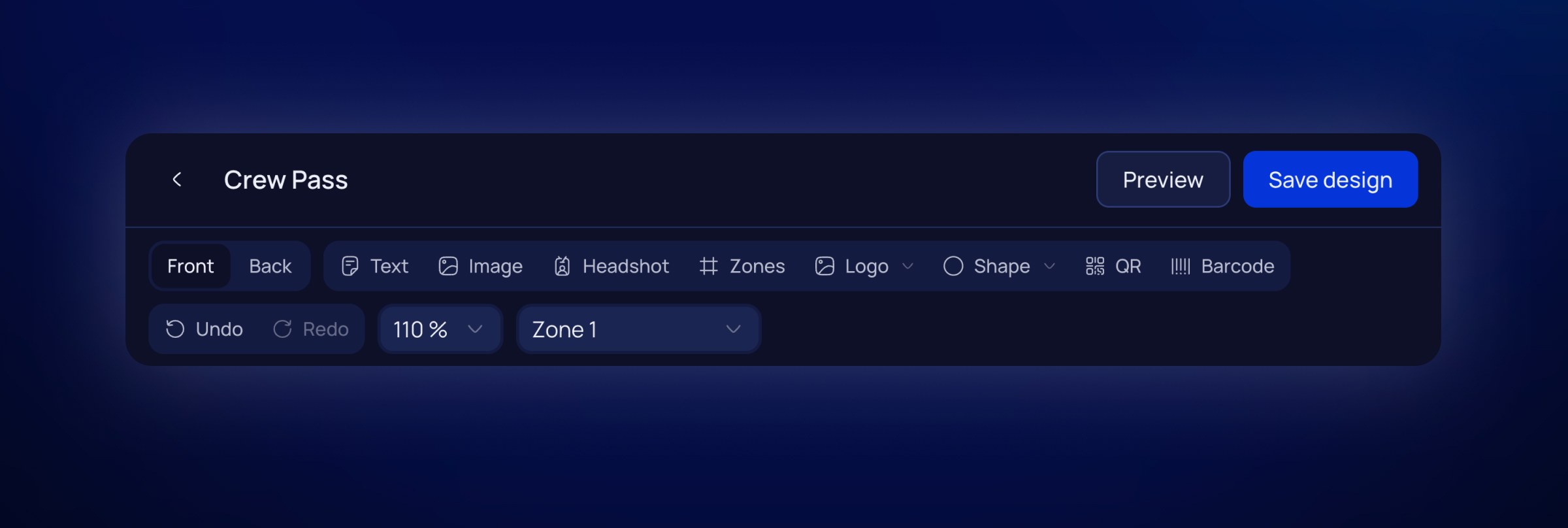
Click an element and the inspector lets you size it, rotate it, align it, and for text insert merge tags. Merge tags are how the template stays generic while every printed pass stays personal: full name, team, role, pass type, event name, serial number, zones, photo, logos, QR, and the team portal link when you need it.
The zones element is where a lot of events used to lose hours. Instead of drawing eight little boxes by hand and hoping the labels still match production when a zone gets renamed, you drop one zones block on the canvas. It pulls the event’s zones, lays them out as styled cells, and lets you control fill, border, type and which zones appear. On print, each person’s assigned zones fill that block. The fiddly grid work stays in the designer once; the pass list does the rest. And because our zone element is intelligent, you only have to style the active and non active zone once.
From design to stack of PDFs
Designing the template is only half the job. The useful part is printing without a second system. Once a design is attached to a pass type, you generate PDFs from the pass list for the people who are actually approved. No re-typing names. No hoping the spreadsheet matches the badge file from last week.
Vehicle passes use the same designer idea. Gate staff get a branded print that matches the vehicle record, not a Word doc someone emailed at midnight. And if you want your vehicle drivers to print the vehicle passes themselves - that's possible too. The design will be attached as a print-ready PDF.
What makes it special
A lot of tools can place a logo on a rectangle. Fewer keep that rectangle wired to live accreditation data.
The template and the people sit in one event, so approvals and print stay aligned
Merge tags pull names, photos, zones and QR codes from records you already manage
The zones element styles and fills access zones from the event, instead of hand-building a grid per pass type
Canvas sizes are flexible: badges, CR80, fanfolds, custom formats, single or double sided
Pro adds custom fonts so designs can follow the event brand without a hard type ceiling
The same approach covers person credentials and vehicle management
You can print from the pass list instead of exporting a design file into another print workflow
We stopped rebuilding names in a separate badge file. The pass list became the print list.
Where it fits with the rest of AccredTix
Passes are one layer of back of house event operations. Teams still request people through the Team Portal, you still approve pass types, and on site you still search the desk or scan a QR. The designer is how those approved credentials leave as a printed badge or card a staff member can recognise in two seconds.
And for smooth credential pickup our Apple and Google Wallet passes help.