

It's been a busy last month for us with many new features and improvements landing in AccredTix. Most of the work happened in four places: the team portal, guest list, inductions, and the pass designer. There's also a fair amount of email plumbing that you'll never see but will notice by its absence of problems. Here's the list:
Team Portal
Switching between events: If a team manager works across more than one of your events, they no longer need separate links. There's an event switcher in the portal header that lists every event they have access to, and it keeps them on the same team where that team exists in both.
Guest list allocations: Teams can now be given a guest list allocation the same way they get pass allocations. The portal shows how much of it has been used, and managers add guests against it directly. Organisers set the numbers per team from the accreditation side.
Bulk import for guest lists: The same spreadsheet import that already exists for people now works for guest lists. Download the template, fill it in, upload it, fix whatever the validator flags, and submit. Rows that would push a team over its allocation are caught before anything is saved.
A public application link for teams: Each team can have a shareable link that lets people apply to join it without an account. They fill in the team's form, upload a headshot if you ask for one, and the result lands as a pending pass for the organiser to approve. Approved applicants get their induction and pass emails the same as anyone else. Links can be issued and revoked from the team's configuration tab, and there's a copy button so you can drop it into a WhatsApp group.
Guest List
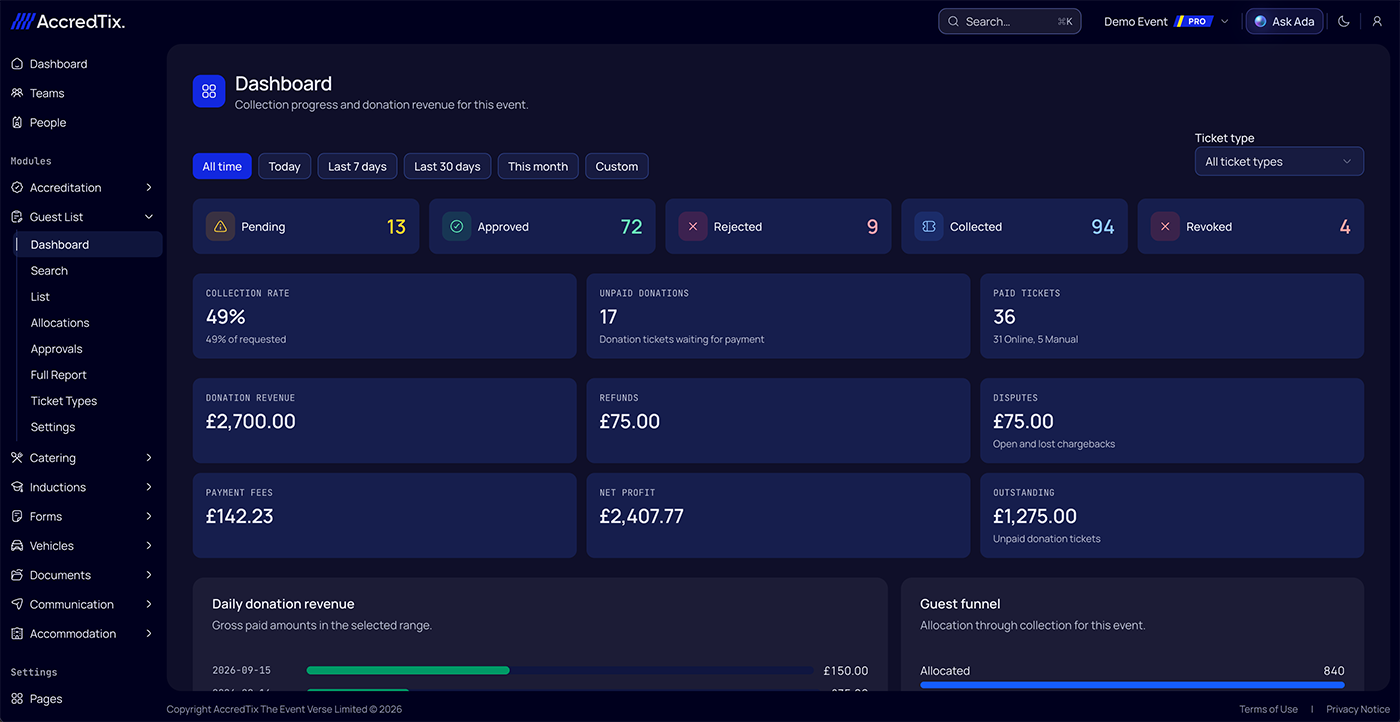
Completely new is our guest list dashboard. Until now the guest list had a list and not much else; if you wanted to know how many tickets had actually been picked up, or how much had come in from donation tickets, you were exporting and adding it up yourself. The dashboard does that for you, per event.
Inductions and team forms
Signature blocks: Both induction forms and team forms have a signature block. People draw their signature on a touchscreen or with a mouse, and it's stored with the response. It shows up as an image in the answers dialog and in exports.
Video changes:
Uploaded induction videos play through a new player with proper captions, a progress bar, and keyboard controls.
Uploaded videos are automatically converted and optimised for faster playback
Captions are generated automatically when you upload a video. They're in the player as a normal subtitle track.
The "watch 90% before you can continue" rule is now optional per video. Turn it off for anything that's reference material rather than mandatory viewing. Where it's on, people can't skip ahead of the furthest point they've reached.
Videos remember where someone stopped, so a person who closes the tab halfway through picks up from the same spot.
Resend completion emails: From an induction response you can now resend the completion email, including the pass and any attachments. Useful when someone says they never got it.
Pass designer
Copy a design from another event: Both accreditation pass templates and vehicle pass templates can be copied from any event you have access to. Zones, images, and fields come across; you then adjust for the new event.
Image opacity: Each image element on a pass has an opacity slider. Faded background logos and watermarks without editing the source file.
Transparent colours: Colour pickers throughout the designer accept an alpha channel, so translucent fills and overlays work as you'd expect.
Vehicle pass PDFs are now generated with editing restrictions so they can't be altered after download. Comes in handy when you send out the Vehicle Pass directly to the Driver to print out.
One send log for the whole account. The email send log used to be per event. There's now an Emails page at the account level that lists every message sent across all events, with the same filters and detail view.
Smaller things
Wallet passes used for guest list pickup now show the ticket type rather than the team name.
Fixed a case where Apple Wallet passes lost their logo after an update and wouldn't refresh.
In group settings, "Overwrite on existing teams" pushes the group's accreditation info page to every team already in the group, not only new ones.
Ada, the in-app assistant, now asks for on-screen confirmation before running bulk actions or deletions. It shows what it's about to do and waits.
If you want to find out what we're currently working on, check out our Roadmap.